Blog
Back
Best AI Phone Answering Software for Small Teams on a Budget
The best AI phone answering software for a small team on a budget answers every call 24/7, captures leads, blocks spam, and lets you start free before you pay. If a tool cannot do those four things at a price you can test without risk, it is not built for a small team. This guide shows you what to compare, which costs to watch, and how to shortlist fast.
Why Small Teams Need AI Phone Answering
Small teams miss calls because the people who answer the phone are also doing the work. A plumber is under a sink. A dental assistant is with a patient. A contractor is on a roof. Every missed call can be a lost customer who simply dials the next business on the list.
Hiring a full-time receptionist fixes the problem, but it is expensive. You pay for salary, training, and cover for evenings, weekends, and sick days. A traditional call center adds per-minute bills and scripts that feel generic.
AI phone answering software closes that gap. It answers phones 24/7, handles common questions, takes detailed messages, and sends you the details. It sounds like a person, works like a machine, and costs a fraction of a staffed front desk.
What the Best AI Phone Answering Tools Do
The best AI phone answering tools cover the core front-desk jobs without extra setup. Use this list as your baseline. A tool that misses one of these is a weaker fit for a small team.
- 24/7 Call Answering – Picks up every inbound call, including after-hours and overflow calls, so no caller hits voicemail.
- FAQ Handling – Answers common questions about hours, services, and areas served with the same accurate answer every time.
- Lead Capture – Collects the caller's name, number, and reason for calling so you can follow up with real context.
- Message-Taking – Records structured messages instead of half-heard voicemails.
- Spam Blocking – Detects robocalls and spam so your phone only rings for real opportunities.
- Call Notifications and Summaries – Delivers a short summary of each call so you know what happened without listening back.
- Appointment Booking Support – Handles booking conversations so callers can move toward a confirmed time.
If you mostly need cover outside business hours, our guide to AI receptionists for after-hours coverage walks through what matters most at night and on weekends.
How to Compare Pricing on a Budget
Compare pricing by the cost of one answered call, not by the headline monthly fee. A low monthly price with a tight call allowance can cost more than a higher plan once you count overage charges.
Before you commit, check these points on every pricing page:
| What to check | Why it matters for a small team |
|---|---|
| Free plan or free trial | Lets you test real calls before you spend anything |
| Credit card at sign-up | No card needed means no surprise charges |
| Included calls or minutes | Sets your real cost per call |
| Overage pricing | Decides your bill in a busy season |
| Features by plan | Summaries, recordings, and notifications are often plan-specific |
| Contract terms | Monthly plans keep you flexible as call volume changes |
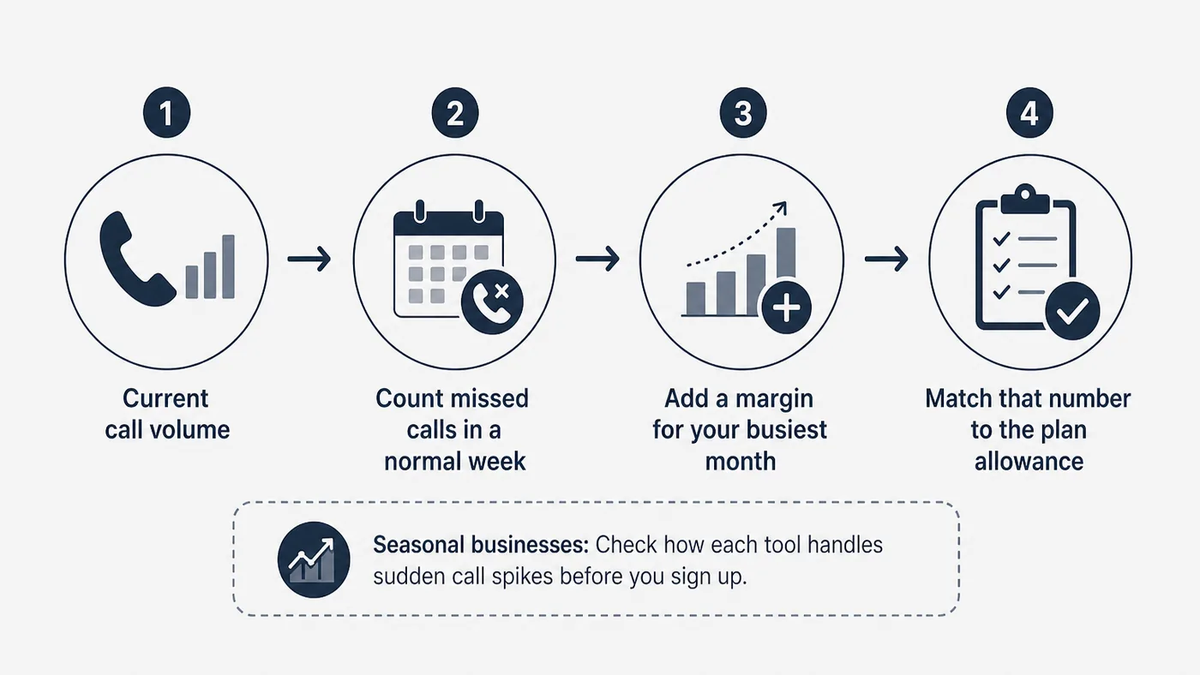
Start with your current call volume. Count how many calls you miss in a normal week, then add a margin for your busiest month. Match that number to the plan allowance. Seasonal businesses should check how each tool handles sudden call spikes before they sign up.
A budget AI receptionist should also save time, not just money. Spam blocking and clear call summaries cut the minutes your team spends on the phone every day.
How to Shortlist AI Phone Answering Software
Shortlist AI phone answering software in four steps: define your call needs, check the free entry point, run a real test, and review the call data. This keeps the decision quick and grounded in your own calls.
First, list what callers ask you most often and what you need from every call. Second, keep only tools with a free plan or a no-card trial. Third, forward a share of real calls for a week and listen to how the tool handles them. Fourth, read the summaries and messages it produces and decide whether you could act on them without calling back to ask more questions.
Common names you will see on comparison lists include Smith.ai, Rosie AI, Goodcall, Upfirst, and Dialzara. Each takes its own approach to plans and features, so run them through the same checklist instead of trusting a ranking. For a wider view of the field, our comparison of the best AI receptionists for small service businesses covers what to check across the US market.
Which Businesses Get the Most Value
An AI answering service for a small team pays off fastest where every call is a potential job or appointment. These businesses tend to see the clearest gains:
- Local Service Businesses – Plumbers, contractors, and agencies capture jobs that would otherwise go to a competitor.
- Dental and Legal Practices – Front desks stay free for the people in the room while every caller still gets an answer.
- Sole Traders – One-person businesses get call screening and after-hours cover without hiring.
- Growing Teams – Businesses in a busy season handle call spikes without dropped opportunities.
The common thread is simple. You lose money when the phone rings out, and you cannot justify a full-time hire to stop it.

How CallFix AI Fits a Small-Team Budget
CallFix AI is a fast, low-cost AI receptionist built for service businesses that need every call answered. It answers calls 24/7, handles FAQs, captures leads, takes messages, filters spam, and supports appointment booking.
- Free Forever Plan – Start with free access and a current call allowance. No credit card required.
- Paid Monthly Plans – Move up for higher usage limits, notifications, call summaries, voice recordings, and account support.
- Lead Capture – Collects caller details and intent so you get structured lead information, not loose voicemails.
- Spam Blocking – Filters robocalls so your team only spends time on real callers.
- Consistent Answers – Gives every caller the same accurate information, day or night.
- Spike Handling – Covers seasonal or unexpected call-volume peaks without extra staff.
For a practical rollout, our AI call answering playbook shows how to hand every missed call to an AI agent without losing the human touch.
FAQ
Is there free AI phone answering software?
Yes. Some tools offer a free plan with a limited call allowance. CallFix AI has a Free Forever Plan with plan-specific limits, and no credit card is required. A free plan is the safest way to test how an AI receptionist handles your real calls before you commit to a paid monthly plan.
Can AI phone answering software replace a receptionist?
For many small teams, yes, for the phone side of the job. AI phone answering software answers calls, handles FAQs, takes messages, and captures leads around the clock. It reduces the need for manual reception and after-hours staffing, while your team keeps the work that needs a person in the room.
Will callers know they are talking to AI?
Good AI phone answering software sounds natural and gives clear, consistent answers. What matters most to callers is a fast pickup and a useful response instead of voicemail. Test this yourself during a free trial: call your own number, ask common questions, and judge whether the experience fits your business.
How much should a small team budget for AI phone answering?
Budget by call volume. Count your weekly missed calls, add a margin for busy months, and match that to each plan's included calls and overage rates. Start on a free plan to measure real usage, then move to a paid plan only when you need higher limits or extra features.
Start Answering Every Call
You do not need a big budget to stop losing customers to missed calls. CallFix AI answers phones 24/7, captures leads, and blocks spam for small teams. Start free with CallFix AI today. No credit card required.